
A recruiter pastes a candidate’s CV into a free chatbot to create interview questions. A manager uploads an employee complaint to summarise it. Nobody intends to cause harm. Then someone asks where that information goes, whether the output is fair, and who is responsible when the answer is wrong. That is the uncomfortable starting point for AI in HR. The software may be useful, but the surrounding decisions matter more than the demo.
The ten lessons below come from the places where HR teams usually discover the hard part: unclear ownership, sensitive data, weak testing, and employees who were never told how a system would affect their work.
1. Start with a work problem, not an AI tool
The first question should not be, “Which AI HR tools should we buy?” It should be, “Which part of the work is slow, repetitive, or unnecessarily difficult?” That change sounds minor. It prevents a great deal of wasted effort.
Suppose the HR team spends hours turning policy documents into answers for routine questions. A searchable assistant might be worth testing. If the real problem is that policies conflict with one another, adding a chatbot only makes the confusion easier to access. Fix the source material first.
The same rule applies to recruitment. If hiring managers disagree about the role requirements, an automated screening tool cannot create a fair process. It will simply apply inconsistent criteria at greater speed.
The Chartered Institute of Personnel and Development advises people teams to define the problem, test use cases, assess the effect on roles and skills, and adjust the approach as they learn. It describes AI implementation as a people-centred work-design decision, not an IT rollout.
2. Keep low-risk experiments separate from high-stakes decisions
Not every HR use case deserves the same level of scrutiny. Drafting a plain-language version of an internal policy is different from ranking job applicants. Summarising an anonymised engagement survey is different from recommending who should be dismissed.
Create simple risk bands before the first pilot. Low-risk uses may include brainstorming training activities, improving the readability of a draft, or finding themes in information that contains no identifiable employee details. Higher-risk uses include hiring, promotion, pay, performance ratings, disciplinary action, absence decisions, and employee monitoring.
The Equal Employment Opportunity Commission states that employment discrimination laws apply when employers use AI and other technologies in employment decisions. Its examples cover recruiting, screening, monitoring, productivity assessment, pay, promotion, and termination. A tool does not escape responsibility because an algorithm produced the result.
That distinction should affect approvals, testing, documentation, and human review. A lightweight pilot may be fine for a low-risk task. A high-impact decision needs a much stronger process.
3. Treat employee information as sensitive by default
The third lesson concerns AI employee data privacy. HR teams already handle information that people reasonably expect to remain confidential: salaries, health details, performance notes, complaints, immigration records, contact information, and investigation material. A convenient prompt box does not change the sensitivity of the information being pasted into it.
Set a clear rule before providing access. Employees should know which tools are approved, what information may be entered, what must stay out, and how to report a mistake. “Do not upload confidential data” is too vague on its own. Give examples. A manager may not realise that a named absence note, a screenshot of a grievance, or a spreadsheet of applicants counts as confidential personal information.
Check vendor terms as well. Ask whether prompts are retained, whether customer content is used to train a model, where processing occurs, who can access logs, and how deletion requests work. The answers should be recorded rather than left in a sales call transcript.
Workplace monitoring needs particular care. The Information Commissioner’s Office says employers should consider workers’ data protection rights and use monitoring in a way that supports trust, while its guidance covers transparency, automated processing, and different monitoring methods. An HR department should not treat keystroke counts, webcam analysis, or sentiment scores as harmless because they sit inside a dashboard.
4. Do not let a polished answer create false confidence
Generative systems can produce confident text that is incomplete, invented, or based on a misunderstanding. A tidy paragraph is not evidence that the underlying claim is right.
This matters in HR because a wrong answer can travel quickly. An employee may receive incorrect information about leave. A manager may rely on a made-up interpretation of a policy. A recruiter may accept a generated explanation for rejecting a candidate without checking the actual criteria.
Build verification into the task. Require the person using the tool to identify the source material, check important statements, and mark anything uncertain. For policy questions, link the response to the approved policy page. For summaries, compare the summary with the original record. For generated interview questions, remove anything unrelated to the role.
People should also know when a tool has been used. Concealing AI involvement can make correction harder and may damage trust when an employee discovers it later.
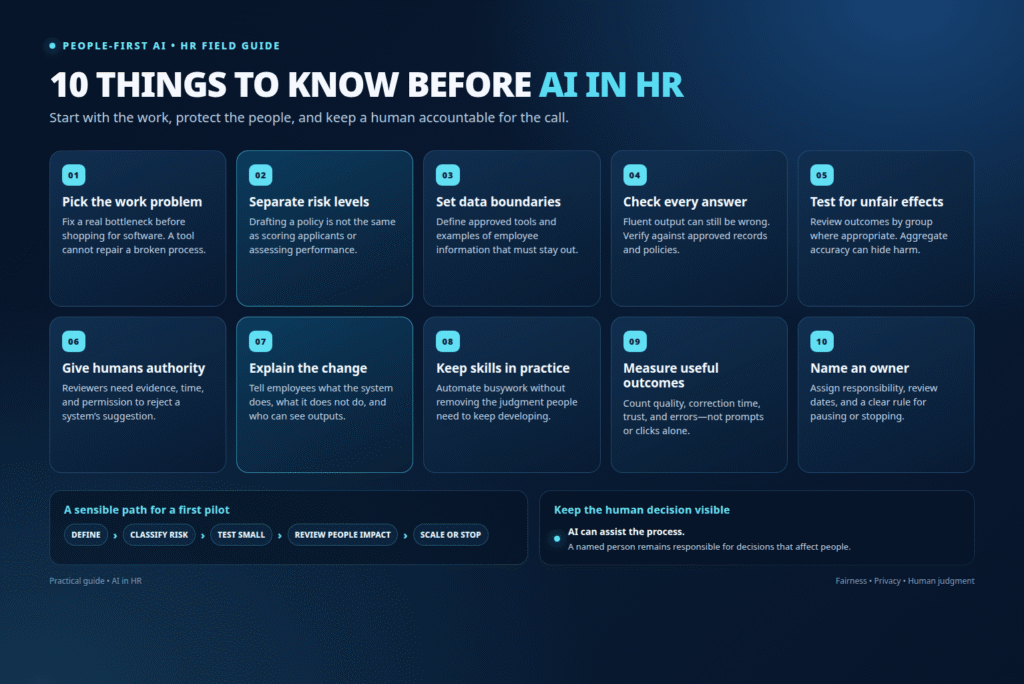
5. Bias testing is not a one-time checkbox
A vendor may say its system has been tested for fairness. That is useful information, but it is not the same as testing the system in your own process.
Bias can enter through the training data, the job description, the labels used for past decisions, or the way a manager interprets an output. A screening model trained on yesterday’s hiring choices may learn that certain backgrounds were selected less often. A video assessment may penalise applicants whose speech, facial movement, or communication style differs from the sample used to build the system.
The EEOC warns that a seemingly neutral technology can still produce an unjustifiable disparate impact on a protected group. Its published examples include disability-related problems in video interviewing and unequal accuracy in facial recognition.
For an AI in human resources pilot, keep records of who was included, what criteria were used, which outcomes were produced, and where errors appeared. Compare results across relevant groups where the data and legal advice permit. Do not rely on a single overall accuracy number. A tool can look accurate in aggregate while failing a particular group.
If the results are troubling, pause the use case. Changing the threshold may not solve a deeper problem in the data or job design.
6. Human review must have real authority
“Human in the loop” sounds reassuring until the human reviewer can only approve the machine’s recommendation. That is not meaningful oversight. It is a rubber stamp.
A reviewer needs time, context, access to the underlying evidence, and permission to disagree. The process should explain what happens when the reviewer rejects an AI suggestion. Does the system learn from the decision? Is the disagreement recorded? Can the employee or candidate request an explanation or correction?
For higher-risk decisions, the person should make the decision rather than merely supervise a score. Responsible AI in HR means preserving a route for judgment, appeal, and correction. It also means accepting that some uses should not be automated at all.
CIPD guidance recommends human oversight for higher-risk decisions and says outputs should be checked, documented, and open to challenge. It also advises keeping high-stakes employee-relations outcomes human-led rather than using AI as the sole basis for warnings, dismissal, or adjustments that could have discriminatory effects.
7. Employees need an explanation before they need training
Training cannot repair a trust problem that the organisation refuses to explain. Before deploying a tool, tell employees why it is being introduced, what it will change, what it will not change, and who can see the information it produces.
The explanation should be specific. “We are using AI to support productivity” invites suspicion. “We are testing a tool that drafts answers from the staff handbook; it will not score employee performance, and a named HR adviser will review every answer” gives people something they can understand.
Invite questions from the people who will use the system and the people whose work will be measured by it. Front-line staff often notice practical problems that a project team misses, such as a category that does not match real work or a workflow that creates extra checking.
This is also where HR automation can go wrong. A process that saves ten minutes of administration but adds uncertainty for employees may not be a worthwhile improvement. Measure the full experience, not just the time removed from one task.
8. Protect skills instead of automating every learning moment
An AI assistant can draft a performance conversation, summarise a meeting, or suggest a development plan. Used carelessly, it can also prevent people from practising the judgment those activities are meant to build.
CIPD has raised concerns about cognitive offloading and skills erosion when people rely on AI consistently in specialist work. It also notes that employees may feel deprofessionalised when meaningful tasks are replaced with passive checking.
That does not mean every task must remain manual. It means teams should decide which skills must stay active. A junior HR adviser might use AI to compare policy versions, then explain the differences themselves. A manager might receive prompts for a difficult conversation, but still prepare, listen, and respond without outsourcing the relationship.
Build learning into the workflow. Ask employees to explain why they accepted or rejected an output. Rotate manual practice. Review cases without AI occasionally. Otherwise, a short-term time saving can quietly weaken the capability the organisation will need later.
9. Measure usefulness, not the number of prompts
Usage dashboards can be deceptive. A high prompt count might mean employees find a tool useful. It might also mean the tool produces poor first answers, creates extra rework, or has become a novelty people are testing.
Choose measures that reflect the original problem. For a policy assistant, track whether employees find the right answer faster and whether repeat questions fall. For recruitment support, review time to shortlist, candidate experience, quality of hiring decisions, and adverse outcomes. For training content, ask whether people can apply what they learned rather than whether they opened an AI-generated course.
Include the cost of review. If every generated document requires a detailed correction, the apparent saving may disappear. Include complaints, corrections, privacy incidents, and employee confidence in the review as well.
The NIST Generative AI Risk Management Framework profile is designed to help organisations consider trustworthiness during the design, development, use, and evaluation of AI systems. It gives HR teams a useful reminder that evaluation belongs throughout the lifecycle, not only before purchase.
10. Give AI a named owner and a stopping rule
The last lesson is about accountability. If nobody owns the use case, small concerns become everyone’s problem and therefore nobody’s priority.
Name the business owner, the technical contact, the privacy adviser, and the person responsible for employee communication. Define what each person can approve. Keep a short record of the tool, its purpose, the information it uses, the groups affected, the checks performed, and the date of the next review.
Add a stopping rule. The pilot ends if error rates exceed the agreed limit, if a privacy incident occurs, if employee complaints reveal an unaddressed harm, or if the tool does not improve the original measure. Stopping is not failure. It is part of responsible testing.
A simple register can help: use case, owner, data type, risk level, approved users, human review requirement, measures, incidents, and next decision. This is more useful than a long policy that nobody reads.
The best AI HR tools are not necessarily the ones with the most features. They are the ones that fit a defined task, use the right information, leave room for judgment, and can be turned off without disrupting the entire people function.
FAQs
1. What is the safest way to start with AI in HR?
Start with a low-risk task that does not require sensitive employee information or automated employment decisions. Define the problem, use an approved tool, remove identifying details, assign a human reviewer, and set a short test period with clear measures.
2. Can AI HR tools make hiring or promotion decisions?
They may support parts of a process, but organisations should not treat an AI score as a final decision. Hiring and promotion can affect people’s rights and careers. Check for bias, document the criteria, provide meaningful human review, and obtain legal and privacy advice for the relevant process.
3. What does Responsible AI in HR mean?
Responsible AI in HR means using AI with clear purpose, appropriate data handling, fairness checks, human accountability, transparent communication, and a way for people to question or correct an outcome. It also includes deciding when not to use AI.


One Response