A rep should not have to open five tabs to work out which prospect needs a follow-up. The Best AI CRM helps a team keep the customer record, next task, and sales context in one usable place, then applies AI to a real job such as summarizing a call or drafting an email. For this CRM comparison 2027, I reviewed eight widely used products against their current published features and plan details. The guide is meant to help teams choose a shortlist, not to declare a universal winner. Product packaging may change before 2027; the plan and feature references below were checked in late 2026.
What the Best AI CRM should do for a growing team
“AI CRM” can describe three quite different things. Generative features write or summarise text. Predictive features score leads, flag deal risks, or estimate a win probability. Agent-style features can research prospects, make calls, or take actions across records. The distinction matters. A draft email with a human approval step is not the same as an agent that changes a record or contacts a lead. Before paying for AI CRM software, check what the feature does, what data it reads, what it costs to run, and whether a person can review its work.
A CRM still has to get the ordinary work right. Can salespeople find the right contact? Can managers see where deals stall? Does a new lead reach an owner promptly? Can the system record a call or email without making the rep reconstruct it later? The AI-powered CRM tools below vary widely in the answers. One team may need marketing and sales history together; another wants a clear pipeline and fewer admin steps. The right CRM for growing teams fits the process they already need to run, rather than adding busywork in the name of automation.
Eight CRM tools to compare
1. HubSpot Smart CRM: shared customer context
HubSpot makes sense for teams that want sales, marketing, and service staff looking at connected contact and company records. Its CRM tracks interactions, deals, tasks, and pipeline activity, with a free starting option. Breeze Assistant can summarize records, prepare users for meetings, and answer questions about CRM activity. Some functions depend on settings, permissions, or connected calendars; workflows and AI agents also have plan and credit requirements. The free-tools pricing page lists a two-user limit, while more advanced workflows require qualifying paid subscriptions. Check whether you are pricing standalone Smart CRM or a bundled Customer Platform, since the two pages show different offers.
Best for: teams that expect sales and customer-facing work to share records. Check first: seat limits, which workflows are included, and whether agent use consumes credits.
2. Salesforce Sales Cloud: configurable sales operations
Salesforce suits teams with a defined sales process that needs routing, approvals, forecasting, reporting, and room to customize. Its AI features include lead and deal insights, predictions, and AI-assisted email drafting. Licensing is the part to slow down for: the current tiers and add-ons do not all include the same AI functions. Salesforce’s documentation says AI-generated sales emails need a relevant lead or contact record and should be reviewed by a salesperson. The vendor also warns that generated content can be inaccurate or harmful. A team should price the workflow it plans to use, not assume an entry suite includes all the features shown on a product page.
Best for: teams with detailed sales steps and an administrator or implementation partner. Check first: the exact edition, paid add-ons, and the time needed to maintain customizations.
3. Zoho CRM: broad features with tiered controls
Zoho CRM covers leads, accounts, contacts, deals, and sales processes, with multiple pipelines and workflow automation. Its Zia AI features include prediction, scoring, recommendations, summaries, and text-generation tools, but availability varies by edition. Some functions also have user-count thresholds or usage quotas. Zoho’s own comparison positions Standard as an entry point, Professional for growing teams that need automation, and Enterprise for more mature sales operations. Those labels can help narrow a trial, but they do not replace a feature-by-feature check. Confirm local billing, data-center availability, and language support before building a process around an AI feature.
Best for: teams wanting a wide set of CRM functions at different plan levels. Check first: quotas, AI tier gates, and the amount of configuration your process will need.
4. Pipedrive: pipeline and rep follow-up
Pipedrive is built around activity-based selling: leads, contacts, tasks, and deals are visible in a pipeline. Its Nova assistant can prepare meeting briefs and summarize activity; the documented meeting tool can also suggest CRM updates for a person to approve. Pipedrive lists Nova as available across plans, while AI email creation starts at Premium and automations, sequences, and email sync begin on higher tiers. Lead-capture tools and other add-ons can affect the bill. This is a focused choice when the team wants reps to move deals and follow up consistently, not necessarily a complete marketing or service platform.
Best for: relationship-led teams that rely on a clear sales pipeline. Check first: plan gates for automations, sequences, and add-ons.
5. Freshsales: sales tools with built-in communication
Freshsales brings contact and deal management together with email, chat, and phone features. Its Freddy AI pages describe contact scoring, email drafting, and deal insights, but the current pricing table places several sales-AI features and sequences at Pro or above. Growth is the lower-cost paid tier; Freddy AI Agent sessions are a separate add-on, not an unlimited included benefit. Freshworks also sells a broader Freshsales Suite for teams that want marketing and sales functions connected. Make sure you are comparing the Sales CRM or Suite that matches your needs; “Freshworks AI” is not one flat entitlement across every product.
Best for: small sales teams that want customer conversations and pipeline work together. Check first: which Freddy features are included at your tier and whether an AI-agent session charge applies.
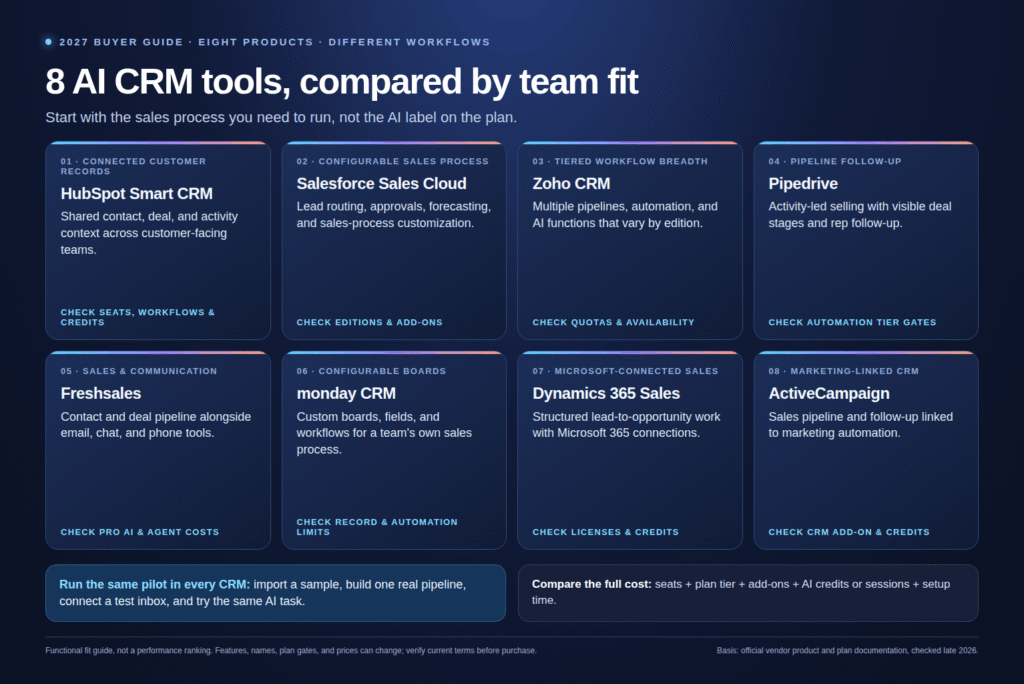
6. monday CRM: configurable boards and workflows
monday CRM is a board-centered system that teams can shape around leads, deals, tasks, and handoffs. That flexibility can be helpful when a company does not want to force its process into a rigid sales template. It can also mean someone must decide how boards, fields, automations, and permissions should work. CRM-specific plan limits change by tier, including active-record and automation caps. AI functions require eligible paid plans and admin activation, and some use credits. monday’s CRM pricing and support pages describe its AI Notetaker entitlement differently, so confirm the current details before buying around that feature.
Best for: teams that value custom boards and want sales workflows to sit alongside other work. Check first: capacity limits, administration effort, and exact AI-credit terms.
7. Microsoft Dynamics 365 Sales: fit for Microsoft-centered teams
Dynamics 365 Sales can be a natural candidate when a team already works in Microsoft 365, Outlook, or Teams. It manages leads and opportunities through sales processes and supports forecasting, quotes, order tracking, and activity history. Copilot can summarize records, help prepare for meetings, and assist with email. Microsoft’s Sales agents have different licensing and maturity levels: some features consume Copilot Credits, some require other licenses, and Sales Close Agent is marked preview. Dynamics has multiple editions, and Microsoft describes several of them for enterprise use. Smaller teams should test the administration and configuration load before assuming the system will be light to run.
Best for: organizations already invested in Microsoft tools or needing structured sales processes. Check first: license requirements, credit use, preview status, and setup support.
8. ActiveCampaign: marketing automation with CRM add-ons
ActiveCampaign is worth comparing when sales follow-up depends on marketing activity, contact segments, and automated campaigns. Its sales CRM supports deals, visual pipelines, task workflows, and personalized outreach, but pipeline management is packaged as an Enhanced CRM add-on rather than included in every base plan. Sales Engagement adds further capabilities. AI features also vary by plan and monthly credit allowance; unused credits do not roll over, according to the vendor’s current help page. The pricing page adjusts to contact volume and selected features, so a single headline rate will not tell a team what its CRM configuration costs.
Best for: teams that want marketing automation closely tied to sales follow-up. Check first: CRM add-on cost, included seats, contact-based pricing, and AI-credit limits.
How to choose without buying an AI demo
Start by writing down the handoff that causes the most friction. It might be a web inquiry sitting unassigned, a salesperson forgetting the second follow-up, or managers asking reps to update a forecast by hand. Then test whether the CRM can make that step less error-prone without making the rest of the process harder. This is a better filter for AI sales automation than a long feature list.
Run the same trial exercise in each shortlisted product. Import a small sample of real, permission-cleared records. Create one pipeline that reflects an actual sales stage sequence. Connect a test inbox or calendar. Ask the AI to summarize a representative call, draft a follow-up, or flag a deal that needs attention. Measure whether the answer uses the right facts, whether the user can check it, and how much time setup takes. If the tool’s job is to send messages or update a record, verify what can happen automatically and what requires approval.
Then price the full configuration. Count seats, contacts, add-ons, implementation time, AI credits, agent sessions, and any fees for annual billing or extra capacity. A low entry price can be misleading if the feature the team actually needs sits two tiers higher. Vendor pages in this CRM comparison 2027 use different billing cycles and packaging, and several vendors change names or bundles over time. Ask for a current quote before choosing; treat the public price page as a starting point, not a guarantee of the full bill.
Data quality deserves a place in the trial, too. AI that summarizes a record with missing fields can sound certain while leaving out a critical detail. Give users permission to correct records, establish who can see sensitive fields, and set a review step for generated customer messages. For agent-style features, test a safe workflow first. The Best AI CRM should reduce a task your team already understands, not make an unreviewed decision harder to spot.
For each pilot, give the vendor the same sample records and the same three tasks: summarize a call, draft a follow-up, and route a new lead to the right owner. Record whether the output is accurate, how many manual corrections it needs, what data the feature can access, and whether completing the task uses credits or an add-on. The Best AI CRM trial should include a failed or incomplete record as well as a clean one; that is where teams find out whether the AI admits uncertainty or quietly fills gaps.
Frequently asked questions
What makes a CRM an AI CRM?
A CRM qualifies when it includes AI features connected to customer or sales work, such as record summaries, email drafting, lead scoring, deal-risk insights, or agents that research and act on records. The Best AI CRM for a team is the one whose available features are useful in its actual workflow and whose data access, plan requirements, and review controls are clear.
Which AI CRM is easiest for a small team to start with?
That depends on the existing process. HubSpot offers a free CRM starting option with user limits; Pipedrive focuses on pipeline and sales activity; Freshsales offers a lower paid tier with a path to more sales features. A team should test its needed users, automation, integrations, and AI usage before choosing based on the word “free” or a starting price alone.
Are AI features included in every CRM plan?
No. Some vendors gate AI tools by tier, sell them as add-ons, or meter them with credits or sessions. Others offer an assistant broadly but restrict particular actions or integrations. Check the current plan comparison and test the exact feature under the account type you intend to buy. The best AI CRM software choice includes the workflow and usage costs the team expects, not simply the feature name in a headline.