If you’re running a small business in the US right now, you’ve probably heard the terms ERP and CRM tossed around like they’re everyday conversation. They sound similar, and it’s super easy to think they’re basically the same thing. But trust me, they’re not – and mixing them up can waste a ton of your time, money, and sanity.
ERP vs CRM for small businesses is hands-down one of the questions I get asked the most by founders who are trying to get organized without turning their whole operation into a tech nightmare. One system is all about your customers and keeping those sales relationships healthy. The other is about running the entire back end of your business – inventory, accounting, supply chain, the works. Getting clear on the real difference is what lets you pick the right tool for where your business actually is today, instead of guessing and regretting it later.
I’ve sat down with so many small business owners over the past few years who started exactly where you might be right now – confused, a little overwhelmed, and just wanting something that actually makes life easier instead of more complicated. In this guide, I’m going to walk you through everything in plain English, share real examples from businesses I’ve helped, and give you a practical roadmap so you can decide what actually fits your size, your budget, and your stage of growth.
Understanding ERP vs CRM for Small Businesses
Let’s cut through the tech-speak and keep this simple, because nobody has time for complicated explanations.
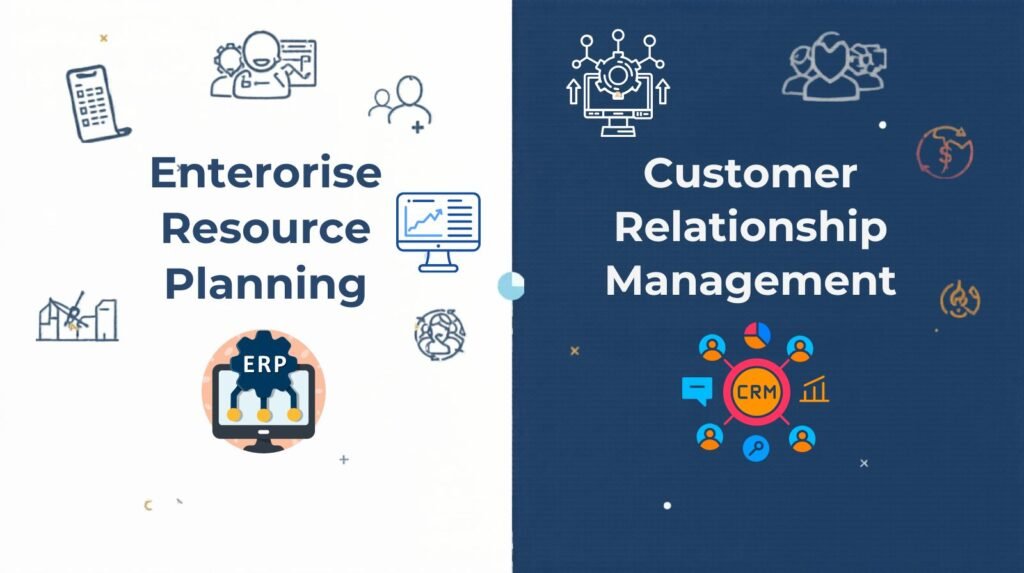
CRM stands for Customer Relationship Management. Think of it as your command center for everything customer-related. It tracks leads coming in, manages your contact list, helps you follow up on deals that are in the pipeline, stores all those important email threads, and keeps your customer service running smoothly. Popular options that a lot of small businesses love right now include HubSpot, Zoho CRM, and Pipedrive. For most small teams, a CRM is usually the very first system they bring in because sales and keeping customers happy are almost always the biggest priorities when you’re trying to grow revenue.
ERP, on the other hand, stands for Enterprise Resource Planning. This is a much bigger, more connected system that ties together every part of how your business actually runs day to day. It handles your full accounting and financials, inventory tracking, purchasing, manufacturing if you make products, payroll, HR stuff, and gives you those big-picture reports that show how everything is performing. It’s like the backbone that makes sure nothing falls through the cracks. For small businesses, popular choices include Odoo (which is super flexible), NetSuite for companies that have outgrown the very basics, and SAP Business One.
The biggest difference really comes down to scope. A CRM helps you sell better and build stronger relationships with the people who pay your bills. An ERP makes sure the whole operation behind the scenes runs efficiently, so you’re not constantly putting out fires. From what I’ve seen, a ton of small businesses start with just a good CRM and only bring in ERP elements later when things like inventory or multi-location operations start getting messy.
I remember one founder I worked with who ran a small e-commerce shop selling handmade skincare products. She started with a simple CRM because closing sales and following up with customers was eating up all her time. Six months later, once she had steady orders coming in, she realized her spreadsheets for inventory were no longer cutting it – that’s when she added ERP-style modules. The switch felt natural instead of forced.
Key Features Side-by-Side – What You Actually Get in 2026
Instead of throwing a bunch of bullet points at you, let me paint a clearer picture of what each system typically brings to the table for a small business right now.
With a CRM, you’re getting tools built around people and relationships. You can easily manage all your contacts and leads in one place, watch deals move through your sales pipeline, set automatic reminders so you never drop a follow-up, connect your email so everything stays in one spot, handle basic customer support requests, run simple marketing campaigns, and pull reports that show exactly how your sales team (or you) is performing. It’s lightweight, fast to learn, and designed to help you grow revenue without getting bogged down in the details of operations.
An ERP goes way deeper into the guts of the business. You get full accounting and financial reporting that actually reconciles everything automatically, real-time inventory and order management. Hence, you know exactly what’s in stock and what’s on the way, purchasing tools that help you keep suppliers happy and costs under control, payroll and basic HR functions in the same system, modules for manufacturing or service delivery if that applies to you, and company-wide dashboards that let you see the health of the entire business at a glance.
In real life, I’ve found that a solid CRM can honestly cover 70–80% of what most small businesses need during the early growth years. ERP only starts feeling necessary when your operations get more complicated – maybe you’ve added physical inventory, opened a second location, or your financial reporting has become a monthly headache that takes days to pull together. Many of the owners I’ve coached began with something like HubSpot or Zoho CRM and only layered in ERP features (like accounting or inventory modules) once they hit around 20–30 employees or started dealing with more complex supply chains.
The Real Pros and Cons – What Owners Actually Experience
I’ve heard so many stories from small business owners about both systems, so let me share the honest upsides and downsides instead of just listing them.
On the CRM side, the biggest wins are how quickly you can get it running and how fast you start seeing results. A lot of these tools can be set up and ready to use in just a day or two. The monthly cost is usually very reasonable – plenty of strong options start free or stay under $20 per user. Your team picks it up fast with minimal training, and you start closing more deals and keeping customers happier almost immediately. It’s perfect if your main focus right now is growth through marketing and sales.
The downside? A CRM doesn’t touch the internal operations side of things. You’ll still be juggling separate tools for inventory or full accounting. Eventually, it can start feeling limited once your business scales up and those operational headaches grow.
ERP systems shine when you need everything connected. One single system means no more copying data between spreadsheets, fewer errors, much stronger financial and operational reporting, and better control over costs as you grow. It can genuinely make the whole company feel more efficient.
But – and this is a big but – ERP tools are more expensive and take longer to implement. Setup can stretch into weeks or even a couple of months. There’s a steeper learning curve for anyone who isn’t super technical. For a very small team, it can honestly feel like overkill at first. I’ve seen owners regret jumping straight into a full ERP because it slowed them down when they really just needed better sales tracking.
The most common regret I hear? Buying a full-blown ERP too early and watching money and time disappear into a system that was way more than they needed. On the flip side, some businesses waited too long and ended up with a chaotic mess of spreadsheets and duplicated work that took months to clean up later.
Which Should You Choose for Your Small Business Right Now?
There’s no one-size-fits-all answer here, but I can give you a really practical way to figure it out for your own situation.
Start with a CRM if your biggest daily pain is managing leads, closing sales, or keeping customer relationships on track. If you have fewer than 25–30 employees, you want quick wins without a huge monthly bill, and your focus is on growing through marketing and sales, a CRM is almost always the smarter first move.
Think about adding ERP (or at least some ERP-like features) when your operations start feeling complicated. That could mean you’re dealing with inventory that keeps running out at the wrong time, you need tighter financial controls and accurate reporting for taxes or investors, multiple departments need to work from the same data, or you’re getting ready to scale past 30–50 employees.
A lot of smart small businesses I work with end up taking a hybrid route. They keep a strong CRM handling sales and customer data, then bring in lightweight ERP modules for accounting and inventory as they grow. Platforms like Zoho One or Odoo are fantastic for this because you can start small and turn on new pieces only when you need them.
The best advice I can give you is to be brutally honest about where your business is today. Most small businesses do amazingly well with just a good CRM for the first few years. Only when operations start feeling chaotic or pulling together financial reports becomes painful do they look at adding ERP.
Take ten minutes this week and write down your biggest frustrations right now. Are they mostly about customers and sales, or are they about the back-end operations like stock, invoices, and efficiency? That one honest answer usually points you in the right direction.
ERP vs CRM for small businesses really doesn’t have to be this big, scary decision. Once you understand what each one actually does and when your business truly needs it, the choice becomes pretty straightforward. You’ll avoid wasting money on tools you don’t need yet and focus on the systems that will actually move your business forward.
The secret is to start simple, stay practical, and only add complexity when your business genuinely demands it. Do that, and you’ll build a tech stack that grows with you instead of holding you back.